
Download PortraitArt – AI Photo to Art Converter, Free & Secure
Overview
PortraitArt is a cutting‑edge, AI‑powered software application that transforms ordinary photos into stunning pieces of art with just a few clicks. Whether you want a classic oil‑painting effect, a delicate watercolor, a bold line sketch, or a printable coloring‑page version, PortraitArt delivers high‑resolution results that look hand‑crafted. The tool is designed for both casual users—who might want to create a personalized gift for Valentine’s Day, Mother’s Day, or a family reunion—and professional designers looking for a quick prototype of a portrait concept.
By leveraging deep‑learning models trained on thousands of artistic styles, the application can reinterpret faces, group shots, wedding snapshots, and even pet portraits while preserving key details such as lighting, expression, and background composition. The user interface focuses on simplicity: upload a picture, choose an art style, adjust a few optional parameters, and hit “Generate.” The output can be downloaded instantly in PNG or JPG format, ready for printing, sharing on social media, or embedding in digital projects. PortraitArt also offers a batch‑processing mode for users who need to convert multiple images at once, making it a versatile addition to any creative workflow.
Security is a top priority; all uploads are encrypted during transmission, and the service does not store personal images beyond the rendering session unless the user opts into cloud storage. In short, PortraitArt merges artistic flexibility with AI efficiency, providing a free and secure way to turn memories into museum‑quality artworks. Its cloud‑based processing ensures that even users with modest hardware can enjoy premium‑grade results, while the regular addition of seasonal templates keeps the creative possibilities fresh throughout the year.
Whether you are a hobbyist experimenting with new visual styles or a marketer seeking eye‑catching visuals for campaigns, PortraitArt’s blend of speed, quality, and security makes it an essential tool in the modern creator’s arsenal.
Key Features & Easy Installation
Features
- AI‑driven conversion to multiple art styles: Oil Painting, Watercolor, Pencil Sketch, Line Sketch, Pop‑Art, Comic‑Book, and more.
- Instant preview before final rendering, allowing fine‑tuning of brush intensity, color saturation, and contrast.
- Batch processing for up to 20 photos in a single session, ideal for family albums or event photography.
- High‑resolution export (up to 300 dpi) suitable for print, canvas, or large‑format displays.
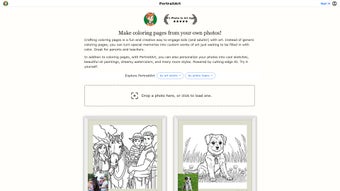
- One‑click generation of printable coloring pages for kids or art‑therapy activities.
- Secure, encrypted upload and automatic deletion of source images after processing.
- Cross‑platform availability: web‑based portal with native apps for Windows, macOS, Android, and iOS.
- Regular style updates and seasonal templates (e.g., holiday themes, graduation caps).
- Cloud‑based AI engine that offloads heavy computation, ensuring fast results on low‑end devices.
- Built‑in sharing options to post directly to Instagram, Facebook, or Pinterest with optimal dimensions.
Installation Steps
Installing PortraitArt is deliberately straightforward to keep the focus on creativity rather than technical hurdles. Follow these steps for a smooth setup:
- Visit the official PortraitArt website or your device’s app store (Google Play, Apple App Store, Microsoft Store).
- Click the “Download Free” button. The web version requires no download—simply sign in with an email or social account.
- For desktop installations, run the installer file (PortraitArtSetup.exe for Windows or .dmg for macOS) and follow the on‑screen prompts. Accept the license agreement and choose an installation folder.
- Launch the application. The first run will prompt you to grant permission for camera and file access—these are necessary for uploading photos.
- Create a free account or log in with an existing profile. Account creation enables cloud storage of generated artworks and access to premium style packs.
- After login, you are presented with the main dashboard where you can upload images, select styles, and start the conversion process.
The web version mirrors the desktop experience, requiring only a modern browser (Chrome, Edge, Safari, or Firefox) and a stable internet connection. No additional plugins are needed, and updates are applied automatically on the server side, ensuring you always have the latest AI models without manual downloads. If you ever need to uninstall, the process is as simple as removing the program from your system’s application list, while your cloud‑saved artworks remain safe in your personal gallery.
Compatibility, Real‑World Usage, and Performance
Compatibility
PortraitArt runs seamlessly on Windows 10/11, macOS 10.15+ (Catalina and later), Android 8.0+, and iOS 13+. The cloud‑based engine also supports any device with a recent web browser, making it accessible on Linux desktops, ChromeOS tablets, and even smart TVs with a web interface. System requirements are modest: at least 4 GB RAM, 200 MB of free disk space for the desktop client, and a stable internet connection of 3 Mbps or higher for optimal AI processing speed. Because the heavy lifting occurs on remote servers, even older laptops and budget smartphones can generate high‑quality artwork without lag.
Real‑World Usage Scenarios
Users often employ PortraitArt for special occasions—creating custom Valentine’s Day cards, Mother’s Day gifts, or graduation announcements. Event photographers appreciate the batch mode to deliver artistic proofs to clients within minutes, while graphic designers integrate the generated assets into marketing materials, such as brochures that feature stylized employee portraits. Teachers use the coloring‑page feature to produce engaging worksheets for art classes, and hobbyists enjoy turning family vacation snapshots into a cohesive gallery wall that looks like a curated museum exhibition. Small businesses leverage the tool to craft unique product‑label artwork, and social media influencers rely on the instant preview to fine‑tune their visual feed without needing a separate photo‑editing suite. Because the AI models are constantly updated, users also notice subtle improvements in texture realism and color fidelity over time, making PortraitArt a future‑proof addition to any creative toolbox.
Performance and Speed
Thanks to the cloud‑centric architecture, most single‑image conversions complete in under 10 seconds on a standard broadband connection. Batch processing of 20 images typically finishes within two minutes, depending on the selected resolution and style complexity. The platform also employs adaptive bitrate streaming for the preview stage, ensuring a smooth, lag‑free experience even on slower networks. Users report that the app’s memory footprint remains low, as local resources are only used for UI rendering and temporary file handling. This efficiency translates into longer battery life on mobile devices and a reduced risk of crashes on older operating systems.
Pros, Cons, FAQ, and Structured Review
Pros & Cons
- Pros:
- Wide variety of high‑quality art styles in a single platform.
- AI processing is fast—most images render in under 10 seconds.
- Free tier provides unlimited single‑image conversions.
- Secure handling of personal photos with automatic deletion.
- Cross‑platform support ensures flexibility for any user.
- Cloud‑based engine eliminates the need for powerful hardware.
- Regular updates introduce seasonal and trending styles.
- Cons:
- Premium style packs require a subscription for full access.
- Batch processing is limited to 20 images per session in the free version.
- Very large high‑resolution files may need a stronger internet connection.
- Some niche artistic styles are only available in the paid tier.
- Internet dependency means offline usage is not possible.
Frequently Asked Questions
Is PortraitArt really free?
Yes, the core application is free and allows unlimited single‑image conversions. Advanced style packs and extended batch processing are offered through optional paid subscriptions.
How secure is my uploaded photo?
All uploads are encrypted via TLS 1.3 during transmission. The server automatically deletes the original image after the AI rendering is complete unless you choose to save it to your cloud gallery.
Can I use the generated artwork for commercial purposes?
Yes, once you have downloaded the artwork, you own the rights to use it commercially, provided you comply with the terms of service. Premium style packs include a commercial‑use license.
What file formats are supported for export?
PortraitArt exports images in PNG or JPG format. PNG is recommended for lossless quality, especially for printing, while JPG offers smaller file sizes for quick sharing.
Do I need a powerful computer to run PortraitArt?
No. The heavy AI processing runs on PortraitArt’s cloud servers, so even modest devices can generate high‑quality results. The local client only handles UI rendering and file management.
Rating: 4.6/5 – PortraitArt combines artistic versatility with a user‑friendly approach, making it a top choice for anyone who wants to turn photos into gallery‑ready pieces.
Conclusion & Call to Action
PortraitArt stands out in a crowded market of image‑to‑art converters by delivering a seamless blend of AI sophistication, artistic depth, and cross‑platform accessibility—all without compromising security or ease of use. Whether you’re crafting a heartfelt gift, polishing a client presentation, or simply experimenting with new visual styles, PortraitArt provides the tools to transform everyday photos into compelling artworks in seconds. The free tier is generous enough for casual experimentation, while the optional premium packs unlock a professional‑grade library of styles for designers and marketers. Because the heavy lifting occurs in the cloud, you can enjoy premium results on a modest laptop, tablet, or smartphone without worrying about hardware limitations. If you’re ready to explore new creative horizons and give your photos a museum‑quality makeover, download PortraitArt today, create your first masterpiece, and discover why thousands of users rate it 4.6 out of 5 stars.
Click here to download PortraitArt for free and start turning memories into timeless art instantly.



.png)



